Order View Flow
Introduction
The View Flow option provides a detailed breakdown of a selected order, displaying item-level, financial, and processing information in a single expanded view. It enables users to review product details, return quantities, payment and refund status, and applied discounts, ensuring complete visibility into the return transaction lifecycle.
Expand Row UI Reference Table
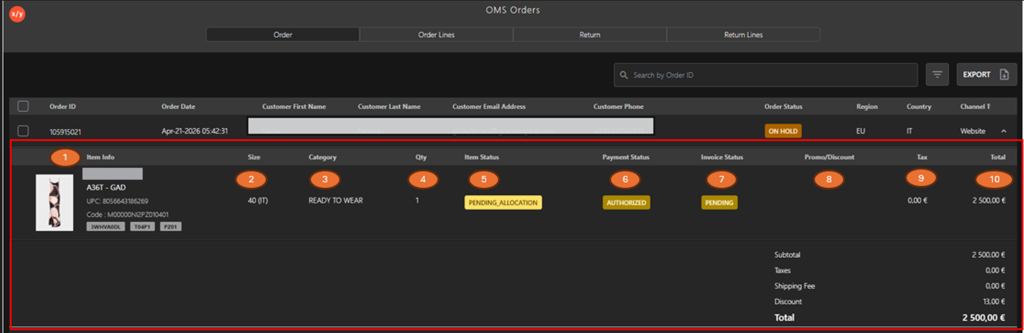
The following table describes the features that support common follow-up tasks.
| Callout ID | Feature | Description |
|---|---|---|
| 1 | Item Info | Display product image and item details (brand, name, UPC, and code). |
| 2 | Size | Display selected item size. |
| 3 | Category | Display product category. |
| 4 | Qty | Display quantity of the item in the order. |
| 5 | Item Status | Display current item processing status (for example, Pending Allocation). |
| 6 | Payment Status | Display payment status (for example, Authorized). |
| 7 | Invoice Status | Display invoice status (for example, Pending). |
| 8 | Promo / Discount | Display applied promotions or discounts. |
| 9 | Tax | Display tax amount applied to the item. |
| 10 | Total | Display total amount for the item. |